2012-09-06

iOS AdHoc delivery - the process of becoming iOS developer

My attempt to explain the AdHoc delivery process.
Everything from creating a developer account, generating a certificate, to deploying your app on a device.


2012-08-30

UINavigationController issue fixed

If you try to push / pop several view controllers in a sequence, animated, the UI stack sometimes get corrupted. Usually you will end up with a screen which is not in the UINavigationController's stack.

It's all an animation issue.
I have finally managed to find a proper fix by subclassing the navigation controller, and using that one instead:
https://gist.github.com/3534773

2012-05-21

iOS SSL renegotiation issue

It seams that the iOS SDK has some issues with SSL renegotiations.
I have filed this bug report:


http://openradar.appspot.com/11495354

2012-04-30

Few iOS Security API hints

Sharing a RSA public key

On the iOS you can generate a RSA key pair using the SecKeyGeneratePair function. However this function doesn't pack the public key into a complete PublicKeyInfo structure. It generates only the public key data annotated below:
So if you need to share the public key (e.g. with the backend) you would usually need to manually add the header. When doing this pay attention to properly adjust the lengths of the first SEQUENCE and the BIT_STRING.


Getting an identity reference for a certificate created in runtime

Let's say you have created your key pair, and shared the public key with the backend. And you have received a certificate containing your public key, which should be used as a client certificate for establishing a 2-way SSL:
  1. DO NOT add the certificate to the keychain by simply inserting it's bytes using the SecItemAdd function. If you do this, you would be able to access the certificate, even get a proper reference for it, but it want get associated  to your private key. So, you want be able to get a proper identity reference for establishing the SSL connection.
  2. You should first use the SecCertificateCreateWithData function, to create a proper certificate reference (SecCertificateRef), which then you provide to the SecItemAdd function, to insert the certificate.
  3. Now you should be able to query the keychain and get a valid SecIdentityRef instance. You can use the same filtering parameters (e.g. keychain item label) which you have used for your certificate.

2011-02-03

iOS Simulator - testing over different connection types

I've been using trafic shaping for quite a long time to simulate slow or noisy connections, but finally made a script for that :)


#!/bin/sh
if [ "$#" -ne "3" ]
then
    echo "Usage:\n$0 <bandwidth in kpbs> <delay in ms> <packet loss ratio>";
    exit 1
fi  

BW=$1
DELAY=$2
PLR=$3
sudo ipfw pipe 1 config bw ${BW}Kbit/s delay $DELAY plr $PLR
sudo ipfw add 1 pipe 1 all from me to not me
sudo ipfw add 2 pipe 1 all from not me to me
echo "RETURN to stop connection noise"
read
sudo ipfw delete 1
sudo ipfw delete 2
exit 0
The script will simply add a pipe to your firewall with the bandwidth, delay and packet loss you specify and redirect all of your Mac's trafic over that pipe. It than waits for RETURN to delete the rule and get your trafic to normal.

Here is a table with some usefull parameters taken from :
ScenarioBw (Kbit)delay (ms)pr (ratio)
2.5G mobile (GPRS)502000.2
3G mobile10002000.2
VSAT50005000.2
Busy LAN on VSAT3005000.4

For more bandwidth info check:

2011-01-19

SSCC - Certificates, keystores and beyond

Certificates

Q: What is a certificate ?
A: A document attesting to the truth of certain stated facts.

Q: What is a digital certificate ?
A: An electronic document which confirms someone's identity.


Other names you can find for digital certificates are:
  • Public key certificates
  • Identity certificates
  • Electronic certificates
  • ...
I will simply call them 'certificates' as I am not going to talk about any other kind of certificates.
The first alternative name listed above is especially interesting, since it uncovers how the identity represented by the certificate can be confirmed - by using a public key. More precisely beside the information representing the identity (e.g. name, address, etc.) the certificate stores a signature that can be then validated by using the public key counterpart of the private key by which the signature was made.


X.509 is a standard covering whole bunch of security related issues, among which is the structure of the digital certificate (X.509 v3):


  • Certificate
    • Version
    • Serial Number
    • Algorithm ID
    • Issuer
    • Validity
      • Not Before
      • Not After
    • Subject
    • Subject Public Key Info
      • Public Key Algorithm
      • Subject Public Key
    • Issuer Unique Identifier (Optional)
    • Subject Unique Identifier (Optional)
    • Extensions (Optional)
    • ...
  • Certificate Signature Algorithm
  • Certificate Signature
As it would take a whole book to cover all of the fields, here I will only talk about the most important few.

Subject is the person or the entity (e.g. company, web server, etc.) to be identified by the certificate. The certificate also includes the public key of the identified subject, which then can be used for validating subject's signatures and encrypting the messages sent to the subject (e.g. SSL).
Obviously you need a way to ensure that the entity which identifies itself by the certificate is really the one certified by this certificate. This is where the issuer comes in. Much as the university stands behind a university degree certificate, the entity represented by the  issuer field stands behind the digital certificate, i.e. it is the entity that verified the subject's data and have issued the certificate.


It is crucial when confirming the identity of some certified entity, not to check the subject's data only, but also to confirm that this data have been confirmed and the certificate have been issued by a trusted issuer.


The validation dates include the period for which this certificate us issued to the subject, that is the period for which the issuer guarantees for the certified identity.
Finally the certificate signature guarantees that the certificate has not been modified since the issuer signed the certificate.
A more popular name for the issuer is certificate authority, or CA. The later is mostly used when discussing about the entity that issued the certificate, while the term issuer is used mostly to refer to the appropriate filed in the certificate.


Example (taken from Wikipedia):

This is an example of a decoded X.509 certificate for www.freesoft.org, generated with OpenSSL -- the actual certificate is about 1KB in size. It was issued by Thawte (since acquired by VeriSign), as stated in the Issuer field. Its subject contains many personal details, but the most important part is usually the common name (CN), as this is the part that must match the host being authenticated. Also included is an RSA public key (modulus and public exponent), followed by the signature, computed by taking a MD5 hash of the first part of the certificate and signing it (applying the encryption operation) using Thawte's RSA private key.

Certificate:
   Data:
       Version: 1 (0x0)
       Serial Number: 7829 (0x1e95)
       Signature Algorithm: md5WithRSAEncryption
       Issuer: C=ZA, ST=Western Cape, L=Cape Town, O=Thawte Consulting cc,
               OU=Certification Services Division,
               CN=Thawte Server CA/emailAddress=server-certs@thawte.com
       Validity   
           Not Before: Jul  9 16:04:02 1998 GMT
           Not After : Jul  9 16:04:02 1999 GMT
       Subject: C=US, ST=Maryland, L=Pasadena, O=Brent Baccala,
                OU=FreeSoft, CN=www.freesoft.org/emailAddress=baccala@freesoft.org
       Subject Public Key Info:
           Public Key Algorithm: rsaEncryption
           RSA Public Key: (1024 bit)
               Modulus (1024 bit):
                   00:b4:31:98:0a:c4:bc:62:c1:88:aa:dc:b0:c8:bb:
                   33:35:19:d5:0c:64:b9:3d:41:b2:96:fc:f3:31:e1:
                   66:36:d0:8e:56:12:44:ba:75:eb:e8:1c:9c:5b:66:
                   70:33:52:14:c9:ec:4f:91:51:70:39:de:53:85:17:
                   16:94:6e:ee:f4:d5:6f:d5:ca:b3:47:5e:1b:0c:7b:
                   c5:cc:2b:6b:c1:90:c3:16:31:0d:bf:7a:c7:47:77:
                   8f:a0:21:c7:4c:d0:16:65:00:c1:0f:d7:b8:80:e3:
                   d2:75:6b:c1:ea:9e:5c:5c:ea:7d:c1:a1:10:bc:b8:
                   e8:35:1c:9e:27:52:7e:41:8f
               Exponent: 65537 (0x10001)
   Signature Algorithm: md5WithRSAEncryption
       93:5f:8f:5f:c5:af:bf:0a:ab:a5:6d:fb:24:5f:b6:59:5d:9d:
       92:2e:4a:1b:8b:ac:7d:99:17:5d:cd:19:f6:ad:ef:63:2f:92:
       ab:2f:4b:cf:0a:13:90:ee:2c:0e:43:03:be:f6:ea:8e:9c:67:
       d0:a2:40:03:f7:ef:6a:15:09:79:a9:46:ed:b7:16:1b:41:72:
       0d:19:aa:ad:dd:9a:df:ab:97:50:65:f5:5e:85:a6:ef:19:d1:
       5a:de:9d:ea:63:cd:cb:cc:6d:5d:01:85:b5:6d:c8:f3:d9:f7:
       8f:0e:fc:ba:1f:34:e9:96:6e:6c:cf:f2:ef:9b:bf:de:b5:22:
       68:9f
To validate this certificate, one needs a second certificate that matches the Issuer (Thawte Server CA) of the first certificate. First, one verifies that the second certificate is of a CA kind; that is, that it can be used to issue other certificates. This is done by inspecting a value of the CA attribute in the X509v3 extension section. Then the RSA public key from the CA certificate is used to decode the signature on the first certificate to obtain a MD5 hash, which must match an actual MD5 hash computed over the rest of the certificate. An example CA certificate follows:

Certificate:
   Data:
       Version: 3 (0x2)
       Serial Number: 1 (0x1)
       Signature Algorithm: md5WithRSAEncryption
       Issuer: C=ZA, ST=Western Cape, L=Cape Town, O=Thawte Consulting cc,
               OU=Certification Services Division,
               CN=Thawte Server CA/emailAddress=server-certs@thawte.com
       Validity
           Not Before: Aug  1 00:00:00 1996 GMT
           Not After : Dec 31 23:59:59 2020 GMT
       Subject: C=ZA, ST=Western Cape, L=Cape Town, O=Thawte Consulting cc,
                OU=Certification Services Division,
                CN=Thawte Server CA/emailAddress=server-certs@thawte.com
       Subject Public Key Info:
           Public Key Algorithm: rsaEncryption
           RSA Public Key: (1024 bit)
               Modulus (1024 bit):
                   00:d3:a4:50:6e:c8:ff:56:6b:e6:cf:5d:b6:ea:0c:
                   68:75:47:a2:aa:c2:da:84:25:fc:a8:f4:47:51:da:
                   85:b5:20:74:94:86:1e:0f:75:c9:e9:08:61:f5:06:
                   6d:30:6e:15:19:02:e9:52:c0:62:db:4d:99:9e:e2:
                   6a:0c:44:38:cd:fe:be:e3:64:09:70:c5:fe:b1:6b:
                   29:b6:2f:49:c8:3b:d4:27:04:25:10:97:2f:e7:90:
                   6d:c0:28:42:99:d7:4c:43:de:c3:f5:21:6d:54:9f:
                   5d:c3:58:e1:c0:e4:d9:5b:b0:b8:dc:b4:7b:df:36:
                   3a:c2:b5:66:22:12:d6:87:0d
               Exponent: 65537 (0x10001)
       X509v3 extensions:
           X509v3 Basic Constraints: critical
               CA:TRUE
   Signature Algorithm: md5WithRSAEncryption
       07:fa:4c:69:5c:fb:95:cc:46:ee:85:83:4d:21:30:8e:ca:d9:
       a8:6f:49:1a:e6:da:51:e3:60:70:6c:84:61:11:a1:1a:c8:48:
       3e:59:43:7d:4f:95:3d:a1:8b:b7:0b:62:98:7a:75:8a:dd:88:
       4e:4e:9e:40:db:a8:cc:32:74:b9:6f:0d:c6:e3:b3:44:0b:d9:
       8a:6f:9a:29:9b:99:18:28:3b:d1:e3:40:28:9a:5a:3c:d5:b5:
       e7:20:1b:8b:ca:a4:ab:8d:e9:51:d9:e2:4c:2c:59:a9:da:b9:
       b2:75:1b:f6:42:f2:ef:c7:f2:18:f9:89:bc:a3:ff:8a:23:2e:
       70:47
This is an example of a self-signed, or root certificate, as the issuer and subject are the same. There's no way to verify this certificate except by checking it against itself; instead, these top-level certificates are manually stored by web browsers. Thawte is one of the root certificate authorities recognized by both Microsoft and Netscape. This certificate comes with the web browser and is trusted by default. As a long-lived, globally trusted certificate that can sign anything (as there are no constraints in the X509v3 Basic Constraints section), its matching private key has to be closely guarded.


If the certificate includes all of the certificates leading back to the root certificate we would say that the certificate includes the complete certificate chain.


Keystores

From Wikipedia:
"A keystore is a repository of security certificates ..."

Although keystore is mostly used to refer to the Java key repository, I will use the term as a general name for a bigger spectrum of file formats which allow secure storing of keys and certificates. Other popular name that you might find is keychain, which is mostly used when speaking about Apple's systems like Mac OS X and iOS.

PKCS12 is one of the most popular keystore standards, and if yours keystore is not coming from the Java world, it is most likely to be a PKCS12. Usually the .p12 file extension is used for this type of files.

JKS is the other most popular keystore standard. The 'J' in the name stands for Java, so if you are using the JDK you would be most likely working with this type of files. It is said to be a better structured and simpler format than the PKCS12, but it is closely bonded to the Java's keytool. If you are looking for a more general and language independent format then PKCS12 is what you should use.

Other formats that I am not particularly familiar with are:
  • JCEKS
  • PKCS11
  • CMSKS
  • IBMi5OSKeyStore
  • JCERACFKS
  • JCECCAKS

Certificate file formats and other mambo-jumbo you might need to deal with 

Abstract Syntax Notation One, or ASN.1, is a standard notation for describing data structures . You can think of ASN.1 as the language (independent of the alphabet) used to describe data structures. Here is an example of a ASN.1 description for the RSA public key embedded in a X.509 PublicKeyInfo structure:


PublicKeyInfo ::= SEQUENCE {
  algorithm AlgorithmIdentifier,
  PublicKey BIT STRING
}

AlgorithmIdentifier ::= SEQUENCE {
  algorithm ALGORITHM.id,
  parameters ALGORITHM.type OPTIONAL
}
RSAPublicKey ::= SEQUENCE {
  modulus INTEGER,
  publicExponent INTEGER
}

Distinguished Encoding Rules, or DER, is a message transfer syntax and is one of the most popular formats for writing certificate data. You can think of the DER as the alphabet used to write the data. Here is one RSA public key (embedded in PublicKeyInfo structure) written in DER: 
Note that the example above is formated and commented for readability, otherwise it is plain array of bytes (30 81 9f 30 0d ... 01 00 01)


XML Encoding Rules, or XER, is a set of XML based rules for writing data described with ASN.1. The above key written in XER would look something like this:

<PublicKeyInfo>
    <AlgorithmIdentifier>
        <algorithm>1.2..840.113549.1.1.1</algorithm>
        <parameters></parameters>
    </AlgorithmIdentifier>
    <PublicKey>
        <modus>8f e2 41 ... dc 90 65</modus>
        <publicExponent>10 00 01</publicExponent>
    </PublicKey>
</PublicKeyInfo>

BER and PER are two other encoding formats that I will omit from this post.


The last format we will describe here is PEM. The Privacy Enhanced Mail standard began as a proposal for securing emails using public keys. Although the standard was never widely deployed, the file format for sharing the public key become very popular and is one of the most common formats you will find your certificates in.
The PEM formated certificate is basically a Base64 encoded DER certificate, enclosed between "-----BEGIN CERTIFICATE-----" and "-----END CERTIFICATE-----" tags.

References


2010-12-15

SSCC - Data scrambling algorithms

A little bit of terminology

As I wrote in my previous post, when it comes to cryptography people usually use the word encryption for any data manipulation algorithm.

Although this is not completely wrong it might lead (at least for beginners) to some confusions especially when we will talk about data signing.
Since this is a beginners course and there is no need of any formal mambo-jambo we can assume that we are talking about digital data, so we can use the term bits manipulation algorithm to refer to any of the algorithms.


Symmetric-key algorithms

I have talked about symmetric keys in my previous post. So obviously the bits manipulation algorithms that use symmetric keys are called symmetric-key algorithms or ciphers. They can additionally be divided into stream and block ciphers, but we will not go that deep in this course, as for more info you can always check the appropriate wikipedia page.
Here is a list of some popular ciphers:
Usually in communication with customers you will have to decide between DES and AES, and it is always better to go with AES as it is newer and more secure algorithm.
AES stands for Advanced Encryption Standard and is often (wrongly) referred to as AES-128 since it is a block chiper with block size of 128.
AES-128 however is the name of one of the three actual algorithms covered by the standard. The 128 part of the name indicates the length (in bits) of the symmetric key used. The other two algorithms are AES-192 and AES-256, following the same naming convention.
The key used for the algorithms does not have any structure, i.e. any bit string of a proper length can be used. Usually the security APIs provide a method for secure random number to be generated which can be used as a key. Lack of randomness in the key might be a security issue.


Asymmetric-key algorithms

The bits manipulation algorithms that use asymmetric keys are called asymmetric-key algorithms, and the appropriate cryptography branch is called public-key cryptography.
As always, the appropriate wikipedia page is a great starting point :)

The asymmetric-key algorithms provide a more complex but also more flexible type of security. It covers scenarios, as I wrote in my previous post, that are not possible to be covered by use of symmetric keys. One other importnat feature is that there is no need of secure initial exchange of the keys. Of corse this last statement might look a little bit strange now, but everything should become clear by the end of this post :)


Encryption
Yes, this is right, we finally got to the point of using the word encryption.
We can define the encryption as type of bits manipulation which purpose is to make the data unreadable by anyone else than the intended audience (usually one person).
It is always best to describe things with examples, so let us use that wikipedia example here. 
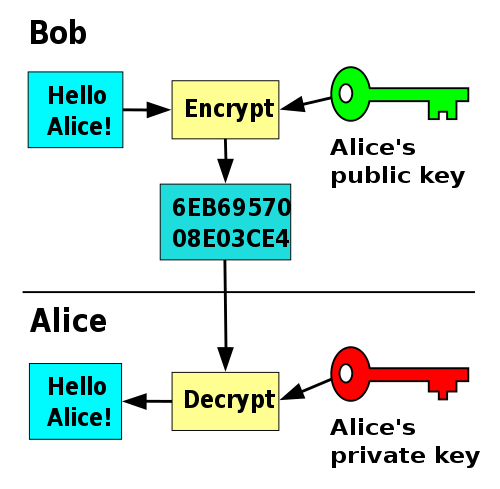
The two persons involved in the communication are Alice and Bob. Let's say that Bob needs to send an encrypted message to Alice. In that case Alice needs to generate a key pair on her computer and distribute the public key to Bob.


Bob can then use the public key to encrypt the data and send the encrypted data to Alice. She can use her private key to decrypt the data and use it. 

You see, since no one else has the Alice's private key only she can read the data, and the only thing that the others can do is send her encrypted messages. That's why it is said that asymmetric-key algorithms don't need secure exchange of the keys, since the only key shared is the one used for encrypting the message and not the one for decrypting it.
One of the most widely used encryption algorithms today is RSA. The appropriate wikipedia page should give you more info that you need, including exact algorithm for key generation, encryption, decryption and whole bunch of security issues and analysis most important of which is the key length consideration.


Signing
In the example above we have shown how Bob can send data to Alice in a way that no one else than Alice can read. But let's now say that Alice wants to send some message to Bob, and Bob needs to verify that the message sent was really from her.
In this case Alice will use her private key to manipulate the bits of the data and Bob can use the public key to read the original message.


We call this type of data scrambling signing since data is not really protected from the general audience as anyone can have the public key which is now used to read the data.
Signing on its own is not much different than encryption as it is just a different type of data manipulation algorithm used for different application (verifying the sender, not protecting the data). 
Since all data scrambling algorithms are quite complex and time consuming, usually the signing is done over a smaller amount of data sent together with the whole message.
Today RSA encryption over some checksum of the data (e.g. SHA1) is mostly used for signing.


Key exchange
One last example that public keys can be used for is secure exchange of a symmetric key over an insecure communication channel. Once the key is securely shared it can be used to establish a secure connection with symmetric encryption of the data.
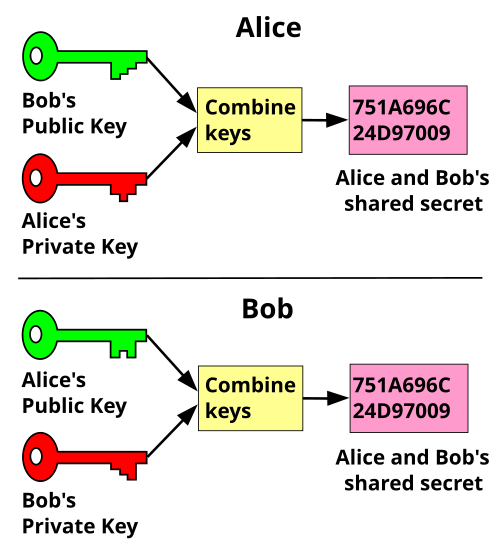
One such protocol is the Diffie–Hellman key exchange protocol shown on the image below.


Both Alice and Bob generate asymmetric key pairs and exchange the public keys between each other. Then they use a combined signing/encryption of the data so that the other person can receive the data encrypted and also be able to verify the sender.
This protocol is now part of the well known SSL protocol which we will talk about in some of my upcoming posts.

SSCC - Keys

For more info on cryptography keys, this wikipedia page is a good start:

Now my short summary

Q: What are keys?
A: The things that lock and unlock our doors so we can keep our home safe and yet let us in.

Q: So, what are keys regarding computer data?
A: Things that lock and unlock our data so we can keep our data safe and yet let us use it.

All the cryptography keys (or simply keys from now on) can be divided in two categories:
  • Symmetric keys
  • Asymmetric keys
If the same key can be used for locking and unlocking the data then we are talking about symmetric key.

On the image above persons A and B both have the same symmetric key K and can share a message securely between each other, as the unauthorized  person C does not have the key and can only see scrambled data.
Usually when we talk about keys one immediately thinks of encryption, but we want use this word yet as encryption might refer to several different types of data scrambling :). Since data scrambling does not sound too much profesional, let us use the term bits manipulation.
When it comes to bits manipulation algorithms that use symmetric keys we are talking about ciphering.

Ciphering is one of the earliest types of protecting data and it dates from long before computers were invented. In some cases, where less security is required cypher algorithms can be very simple. One such example is the XOR logic operator:
100101101 XOR 110011001 = 010110100
010110100 XOR 110011001 = 100101101

Now imagine that your secure zone consists of a group of more than two people. Let say a group of police officers communicating over some computer network. One of the many in the group is the chief and gives orders to the others, while the others must only receive and not be able to send orders. Obviously this restriction can not be done by using a symmetric key, as in order for the group to receive the orders they will need to share the same key, which will enable them to also send orders to the rest of the group. But if we had a key pair instead of only one key, and we use one key from the pair to lock the message, while the other to unlock it, then the officer can have the first key and hence would be able to send orders, while the group can share the second key and would be only able to receive orders.

If we use separate keys for locking and unlocking the data, then we are talking about asymmetric keys.
The key used by the chief and not shared by the others in the group is called a private key, while the shared one is called a public key.

Service Security Crash Course - Preface

In the past several months I've been challenged to work on few e-banking and e-government iPhone applications which required secure communication with the appropriate backends. This series of posts called "Service Security Crash Course" should cover what I have learned while working on these projects. The audience level is "advanced newbie" :), that is the information provided should be enough to bring anyone from a level of "I have heard about certificates" to a level of "it would be much easier if we use certificates from a valid CA" :)

The series should cover:
  • Keys
  • Data scrambling (a.k.a Encryption)
  • Certificates
  • SSL
  • XML Security
All the posts in the series would be prefixed SSCC (as short for Service Security Crash Course)

2010-01-28

IPhone: Open a link into Safari from within web view

Here is the situation:
You have an application in which you use web view to show some content. The client decides that he wants marketing materials, so they provide you with HTML containing links. How do you prevent the web view of loading this links into your app, and force safari to open ?


The answer is - add this method to your web view delegate:
- (BOOL)webView:(UIWebView *)webView shouldStartLoadWithRequest:(NSURLRequest *)request


 navigationType:(UIWebViewNavigationType)navigationType {
    // if the new content is due to click on a link
    if (navigationType == UIWebViewNavigationTypeLinkClicked) {
        // standard way to launch external app, in this case safari
        [[UIApplication sharedApplication] openURL:request.URL];
        
        // tell the web view that we have handle it, so it should stop loading
        return false;
    }
    
    // otherwise, tell the web view to load the content
    return true;
}


IPhone: Error logging


So far I didn't have a real need of good error logging, as most of the apps were isolated, and not to much API that results in a NSError was used. However lately I was working on a library which uses CoreData. The data model is completely dynamic, and even a small misconfiguration of the library might result in some NSError later in the code.
In this case logging the error object itself is not very informative:

NSLog(@"error description: %@", err);
The log will contain the err object but it would be in the form:

error description: Error Domain=ERROR DOMAIN Code=1000 UserInfo=0x1032e70
Although we have the domain and the error code the real info is in the UserInfo dictionary. Core data uses a lot of API that may result in a NSError and it is this dictionary which stores the human readable info. So a proper logging should include the domain, code and the user info:

NSLog(@"error description: %@ [%d]; %@", [e domain], [e code], [e userInfo]);
Resulting in:

error description: ERROR DOMAIN [1000]; { theKey = "Real problem description is hidden here :)"; }
What you should now take care for, is this common BUG template:

NSError *err;
[object someMethodThatMightResultInError:&err];
if (err) {
    ... some error handling ...
}
Usually the method does not guarantee that if there is no error it will initialize the err variable to nil, so you will finish executing the error handling even when there is no error (most probably EXC_BAD_ACCESS since the err message contains garbage)
The solution is of-course very simple:

NSError *err = nil;
...